
 SwingMatch
  CoachNow
 $900/Year for Bolted-On Business Tools. Is CoachNow Academy Worth It?
CoachNow is a content streaming platform for coaches. At $900/yr, Academy adds scheduling and payments — but they feel added on, not built in. Here's what we found.
The Short Version
| SwingMatch | CoachNow | |
|---|---|---|
| Built for | Golf instruction business | Content streaming (60+ sports) |
| Mobile scheduling | ✓ Full mobile support | ✗ Desktop only |
| Scheduling included | ✓ All tiers | Academy only ($900/yr) |
| Video tools | Sharing only | ✓ Draw, compare, voice-over |
| Platform fee | ✓ None (paid plan) | ✗ 0.5% |
Bottom line: CoachNow is a video and content delivery platform with business tools added on. SwingMatch is a business platform built around the operations of instruction programming — where scheduling, payments, packages, and communication all work together as one system.
What CoachNow Does Well
CoachNow is a content delivery platform for coaches — and it's good at that job. The core experience is built around streaming video content to athletes through dedicated "Spaces," which function like social media feeds for each student.
The video tools are strong:
- ✓ Draw lines and angles on swings
- ✓ Compare swings side-by-side
- ✓ Record voice-over while annotating
- ✓ Dedicated "Spaces" per student for ongoing feedback
- ✓ Integrates with Rapsodo launch monitors
If you do remote coaching — students sending videos between lessons, you analyzing and sending back — this is what CoachNow was built for. It's used across 60+ sports in 140 countries. The PRO tier ($499/yr) gives you the full content suite.
Where it gets complicated is when you need more than content delivery — when you need to actually run a teaching business.
What We Found When We Tried It
We signed up for CoachNow and spent time clicking through the platform. The video tools live up to the reputation. But as a business management tool, a few things stood out:
- Features feel like a list, not a system. Scheduling, payments, and video all exist — but they don't connect. Lessons, students, and payments live in separate places without the traceability you'd expect from a business tool.
- Scheduling and templates are desktop-only. We tried setting up scheduling on mobile — it's not available. You need to be at a computer to configure your bookings and templates.
- Booking setup takes work to figure out. CoachNow calls offerings "bookings." Schedules exist but are conceptually difficult to understand and set up — especially if you're someone who thinks visually. Packages and payment tracking are technically there, but clunky to configure and manage.
- Calendar is limited to single time blocks. Rolling availability only, with one continuous block per day. If you teach before and after your shift at the course (say 7–9am and 2–5pm), you can't represent that in a single schedule.
- Storefront isn't intuitive. There may be a way to create a public-facing profile, but we couldn't figure it out during our trial. What we found was closer to sharing a schedule link than browsing a storefront with services, rates, and availability laid out clearly.
- Communication is content-first, not lesson-first. Spaces work like social feeds — great for streaming content, but lesson-specific notes and history get lost in the scroll. There's no structured way to tie communication back to a specific lesson.
None of this is surprising when you understand what CoachNow is: a content platform that added business features. The content side is polished. The business side feels like it was built second — because it was.
Scheduling
Scheduling requires CoachNow Academy ($900/yr). SwingMatch includes it on all tiers, including free.
| SwingMatch | CoachNow | |
|---|---|---|
| Availability model | Additive (add times you're free) | Rolling (set weekly hours) |
| Cascading | ✓ | ✗ |
| Booking priority | ✓ Tag-based | ✗ |
| Mobile access | ✓ Full mobile support | ✗ Desktop only |
| Split availability | ✓ Multiple blocks per day | ✗ One continuous block |
| Individual booking slots | ✓ Exact start times | ✗ Booking window |
Why additive matters ▼
CoachNow's rolling model assumes you work the same hours every week. Set "9-5 Monday through Friday" and block out conflicts as they come up. You're also limited to one continuous time block per day — so if you teach before and after your shift (say 7–9am and 2–5pm), you can't represent that in a single schedule.
Here's how CoachNow handles availability:
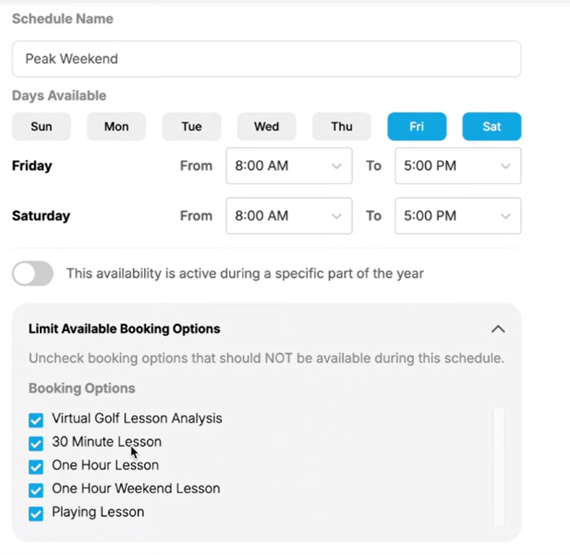
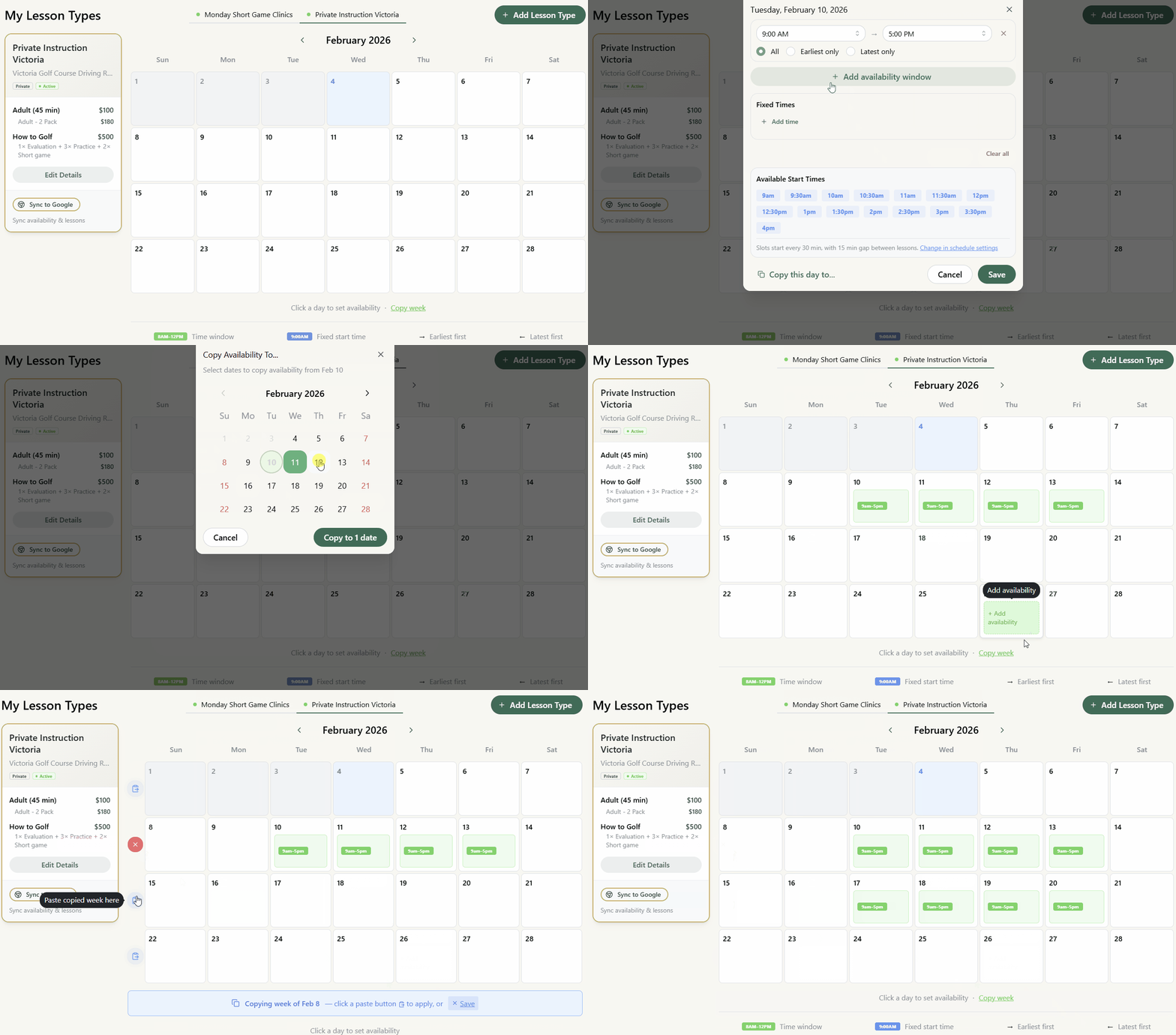
That works — but most pros have tournaments, member events, and pro shop shifts constantly changing their week. With SwingMatch, you start with nothing and add what's actually available. Consistent hours every week? That works too — just copy last week. The flexibility is there when you need it.
Here's how easy it is in SwingMatch:
Why cascading matters ▼
Most pros work shifts. You might have time after your shift to teach, but you don't want a 4pm lesson when your shift ends at 2pm — that's two hours of waiting.
With SwingMatch, cascading solves this. Set 2-5pm available, but students only see the 2pm slot. Once booked, 3pm opens. Your schedule fills front-to-back, ensuring back-to-back lessons around your shift.
Why booking priority matters ▼
With SwingMatch, tag students (members, public, VIP — whatever you want) and control when each group can book.
Set days in advance: members can book 4 weeks out, public students only 1 week. Set days of the week: Wednesdays for new clients, other days reserved for existing students.
One availability, different access. No need for separate calendars or booking links.
Payments
Both use Stripe. CoachNow adds a 0.5% platform fee on top.
| SwingMatch | CoachNow | |
|---|---|---|
| Platform fee | ✓ None | ✗ 0.5% on top of Stripe |
| Checkout | In-app | Leaves to Stripe page |
| Pass fees to students | ✓ | ✗ |
| Offline payment tracking | ✓ | ✗ |
Why in-app checkout matters
When students leave your booking flow to pay on a separate Stripe page, you lose them. They get confused, distracted, or abandon the booking entirely. With SwingMatch, payment happens right in the app — no redirects, no drop-off.
Why passing fees matters
Online payments mean fewer no-shows and no chasing e-transfers. But Stripe charges 2.9% + $0.30 per transaction — on $30,000/year, that's ~$960.
With SwingMatch, add a small booking fee that students pay. You get all the benefits of online payments at zero cost.
Prefer cash or e-transfer for some students? SwingMatch tracks offline payments too — CoachNow doesn't.
Communication
This is where the content-platform DNA shows up most. CoachNow organizes communication around Spaces — social-media-style feeds where posts, videos, and messages flow together. SwingMatch organizes communication around lessons and student profiles.
| SwingMatch | CoachNow | |
|---|---|---|
| Organization | Per lesson + student profile | Spaces (feeds/group chats) |
| Lesson history | ✓ Attached to each lesson | ✗ Mixed into feed |
| Direct messaging | ✓ Separate in-app chat | ✓ Within Spaces |
| Group messaging | ✓ One-way or two-way | ✓ |
| Notification control | ✓ SMS or email | — |
Why lesson-based organization matters
Spaces work like social feeds — posts, videos, and messages all in one stream. That's a real business model: subscription-based content delivery. Subscriptions are great for highly committed athletes — they bridge the price gap between a 3-pack and a 10-pack by spreading payments across a longer coaching plan. But it's one model, and not every student will commit to an ongoing subscription. Some just want to book a lesson, show up, and get better. For those students, lesson-specific notes and history get lost in a feed that wasn't designed around individual sessions.
With SwingMatch, the structure is built in. Notes and videos attach to each lesson. Open a student's profile and see every lesson, what you worked on, and their progression over time. Questions and scheduling happen in a separate direct chat — not buried in the lesson feed.
One view for teaching history. One view for conversation. No scrolling through months of posts to find that swing video from April.
Need to blast a message to your whole roster? SwingMatch has group messaging too — set it one-way (announcements) or two-way (discussion), and choose whether to notify via SMS or just email.
Video Tools
SwingMatch doesn't have video analysis tools. We handle scheduling, payments, and student management — and work alongside whatever video tools you already use.
| SwingMatch | CoachNow | |
|---|---|---|
| Video markup/drawing | ✗ | ✓ |
| Side-by-side comparison | ✗ | ✓ |
| Upload to lesson notes | ✓ | ✓ |
Use what you already have
Mark up a swing in CoachNow, OnForm, or Sportsbox AI — then upload it to the lesson notes in SwingMatch. The analysis lives where you did it. The record lives with the lesson.
We're not in the video analysis space, and our pricing reflects that. If you need markup tools, use a dedicated video app. If you need scheduling, payments, and student management — that's what SwingMatch is for.
Pricing Comparison
CoachNow
- Analyze: $59/yr — basic video tools
- PRO: $499/yr — full video suite, Spaces
- Academy: $900/yr — adds scheduling, booking, team features, 0.5% fee on payments
SwingMatch
- Free: $0 — scheduling, packages, 10% fee on online payments
- Pro: $449/yr — all features, no platform fee
- Academy: $1,499/yr — 6 Pro accounts for your team
The Bottom Line
CoachNow and SwingMatch are built around different core ideas:
CoachNow is a content delivery platform that added business tools. Video markup, Spaces, and subscription-based coaching are its strengths. At $900/yr, Academy bolts on scheduling and payments — but the features feel disconnected from each other, and key workflows like scheduling are desktop-only.
SwingMatch is a business platform built around the operations of golf instruction. Scheduling, payments, packages, and communication all work together as one system — designed for how golf pros actually run their day.
The difference isn't just what each tool offers. It's how organized and connected everything is once you start using it.
Frequently Asked Questions
I already use CoachNow for video. Should I switch? ▼
Can I use CoachNow for video and SwingMatch for booking? ▼
Why doesn't SwingMatch have drawing tools? ▼
What's "cascading availability" and why does it matter? ▼
Is CoachNow Academy's scheduling good enough? ▼
Try Both
The best way to decide is to try them:
- CoachNow — Free trial available
- SwingMatch — Free tier available, 14-day Pro trial
Set up both, test with a few students, and see which fits how you actually work.
More Comparisons


Ready to Try SwingMatch?
Join instructors who've simplified their booking and grown their business.
Get Started Free